İçeriğe atla
Dijiyon site yönetim yazılımı logosu

9 ekran

Accounting

Books, reports and the budget form themselves in the background; the enforcement of uncollectable receivables sits in the same section. When you go to an audit or a general assembly, you download the table on letterhead.

  • Trial balance, balance sheet and general ledger build themselves
  • Units in debt are ordered by how old the arrears are
  • Planned and actual side by side in the budget
Dijiyon Accounting screen

Ekranlar

This is how Accounting looks in the panel

Every image below is taken from Dijiyon's real interface; none of them is a mock-up.

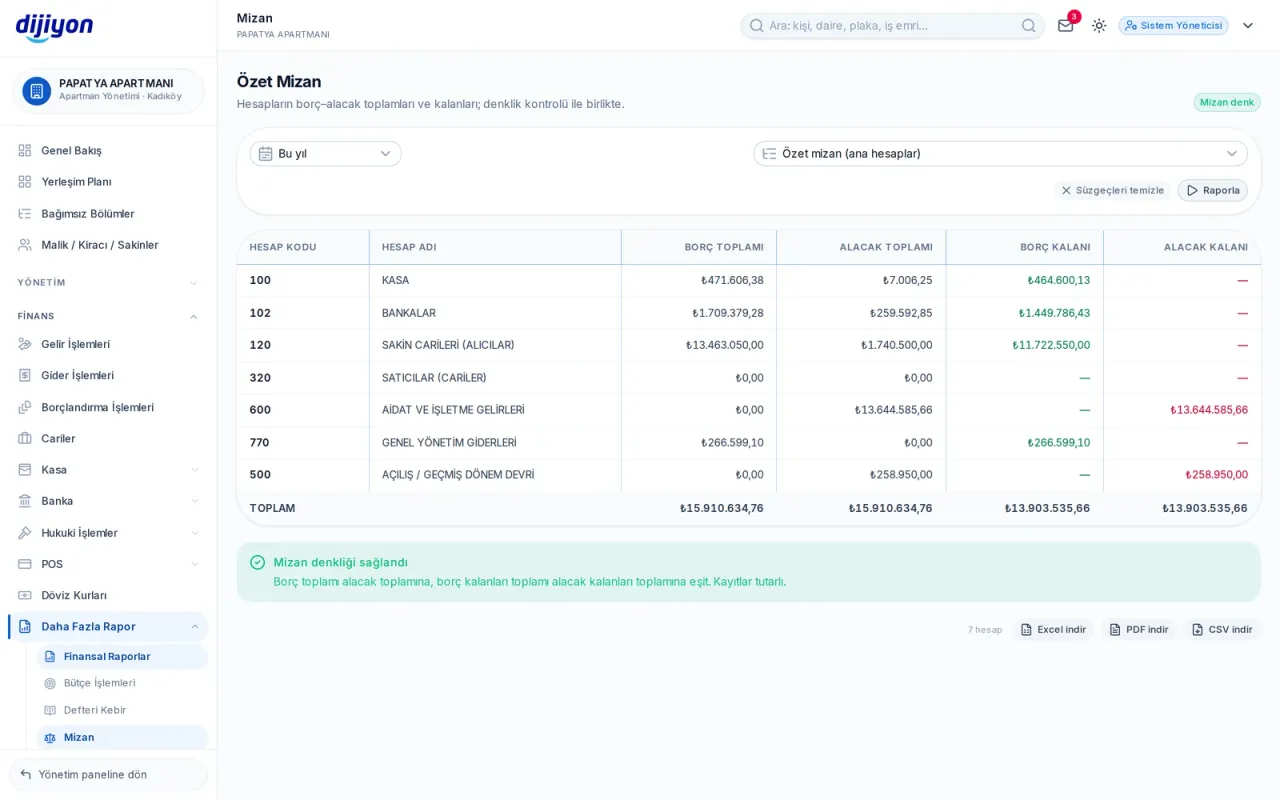
Accounting · Trial balance — are debit and credit in balance

Trial balance — are debit and credit in balance

The debit-credit totals and remainders of the accounts in one table. The summary trial balance shows main accounts; in the detailed one, sub-accounts open when you click a row, and the equality check is confirmed by a badge under the table.

  • Summary and detailed (sub-account) trial balance
  • Account code, account name, debit and credit balance
  • Equality check between total debit and total credit
  • Date range filter and total row
  • Excel, PDF and CSV download
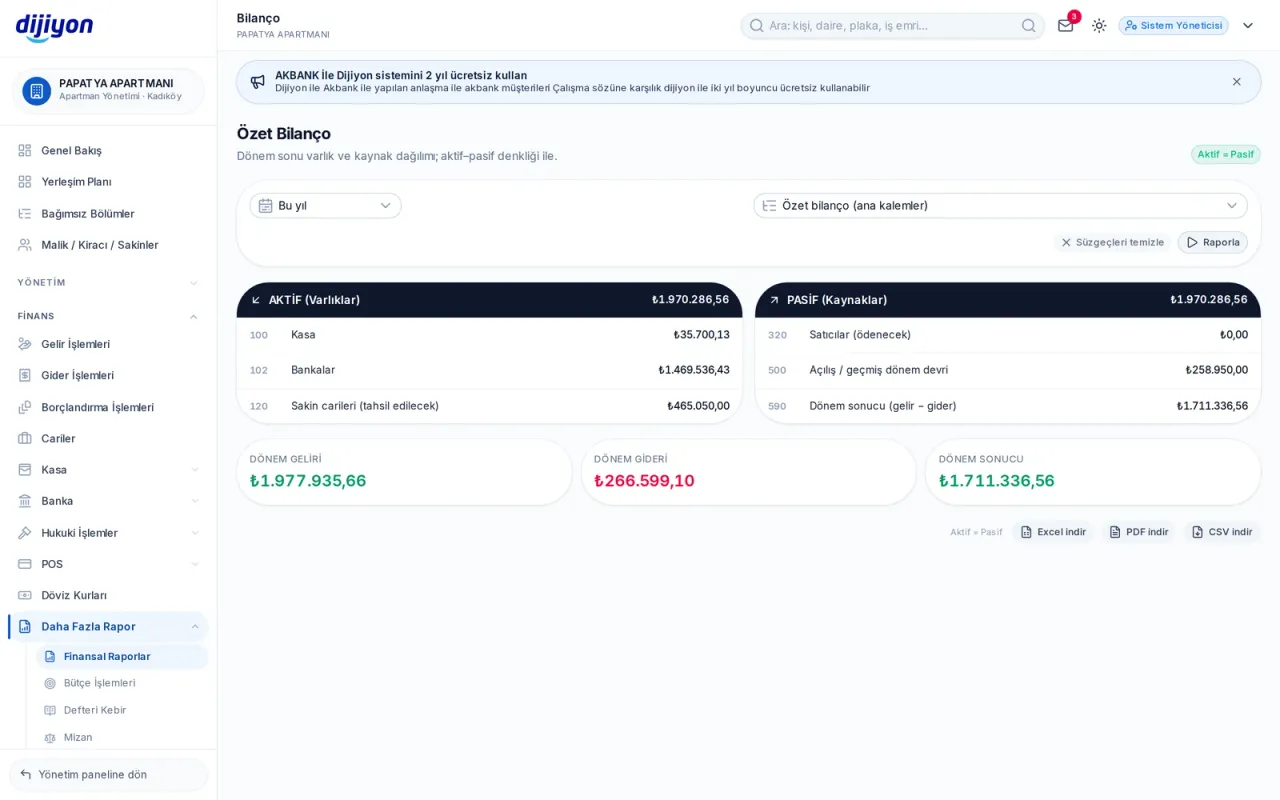
Accounting · Balance sheet — assets and liabilities side by side

Balance sheet — assets and liabilities side by side

Assets and sources are listed in two separate sections; period income, period expense and the period result sit on separate cards. The equality of assets and liabilities is confirmed by a badge.

  • Asset and liability blocks
  • Summary and detailed balance sheet
  • Period result in the colour of profit or loss
  • In the output, assets and liabilities carry separate total rows
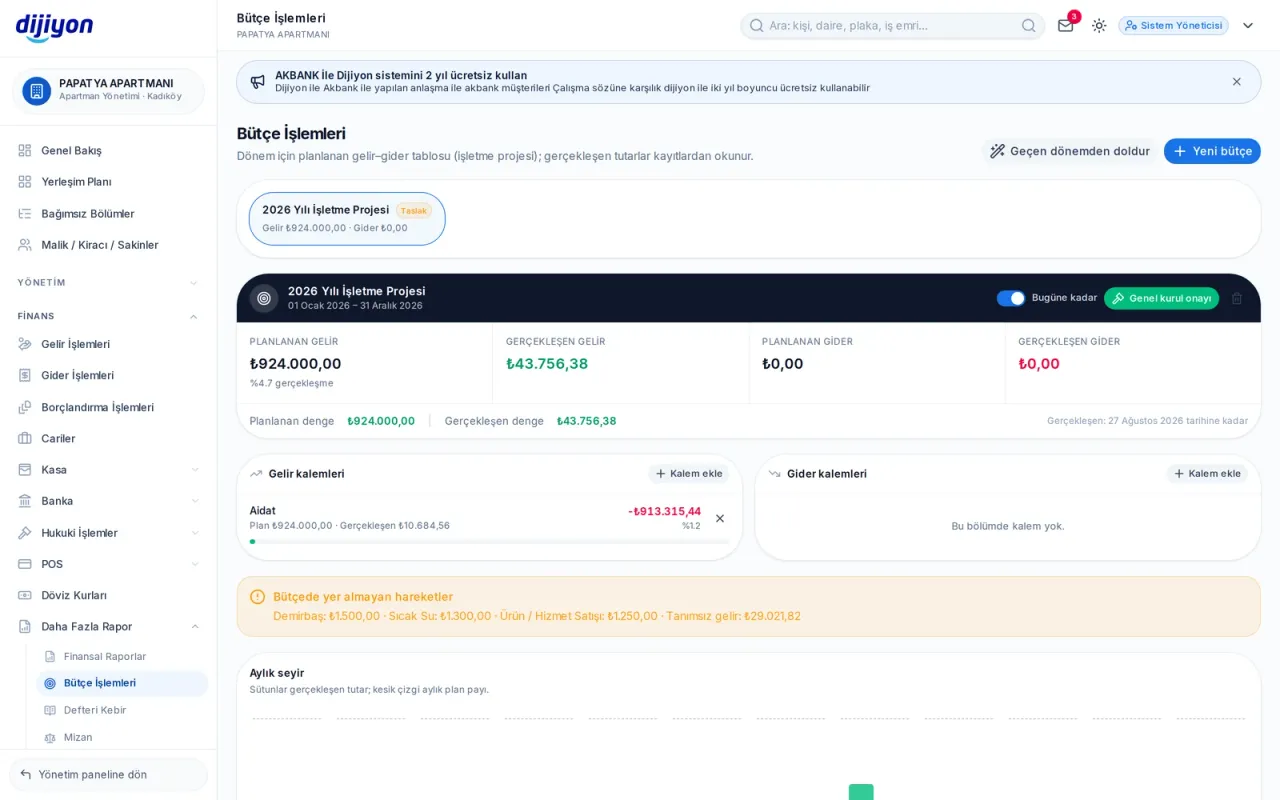
Accounting · Budget — planned against actual

Budget — planned against actual

The annual operating plan is entered item by item; as the months pass, planned and actual are followed side by side. Movements outside the budget are gathered in a separate warning box, so deviation shows early.

  • Draft, approved by the general assembly, and closed period
  • Filling in from the previous period with an increase rate
  • Deviation and realisation percentage per item
  • Monthly trend chart: actual amount and share of plan
  • Income and expense items can be linked to income-expense types
Outstanding balances — who, how much, for how many days

Outstanding balances — who, how much, for how many days

Units with an open balance are listed on a single row with owner and tenant together; the late charge is calculated by the same engine as the account statement. Clicking an ageing band filters the list to that band.

  • Not yet due, 1-30, 31-60, 61-90 and 90+ day bands
  • Principal and accrued late charge in separate columns
  • Search by owner, tenant, block and door number
  • Debts handed to enforcement do not appear in this list
  • Letterheaded output with a total row
General ledger — the ledger account by account

General ledger — the ledger account by account

Each account sits on its own card: carry-over from the previous period, the period's movements and the total. As there is no separate journal module, the source voucher number is used instead of a journal number.

  • Carry-over, movements and total row together
  • The voucher source is marked by a letter: accrual, collection, till, bank, expense, opening
  • A single account or all accounts
  • The remaining balance and its direction in the card header
Financial reports — six reports on one screen

Financial reports — six reports on one screen

Income, expense, bank, till, receivable-payable and owner/tenant transactions are all taken from the same screen. The columns and filters change with the report type; a column with no data never appears in the table.

  • Type-specific filters and summary cards
  • Payment method, transaction type and matching status
  • The scope of the third-party account report is stated plainly on screen
  • Excel, PDF and CSV download
Enforcement tracking — from file to collection

Enforcement tracking — from file to collection

An uncollectable receivable is handed to an enforcement file. Debts from before the follow-up date appear in the file and those after it on the person's account; which items were handed over is listed in a separate window.

  • File number, enforcement office, debtor and lawyer
  • Follow-up amount, costs and attorney's fee
  • Open, contested, collected and dismissed statuses
  • A separate breakdown of collections through enforcement
  • Partner lawyer cards and attorney fee rate

Start free

Open these screens on your own property

Open a free account; setup, data migration and training are on us.

Call us

Kapsam

The screens under Accounting

Every line is a real screen you can open and use in the panel.

Financial reports

Accounting and finance reports

Outstanding balances

Units in debt and overdue ageing

Trial balance

Debit-credit balance table

Balance sheet

Assets and liabilities: till, bank, accounts

General ledger

Ledger by account

Budget

Budget plan and realisation

Enforcement files

Enforcement follow-up and files

Enforcement collections

Collections received through enforcement

Lawyers

Records of partner lawyers

Start free

See the Accounting screens on your own property

Open a free account to see more; setup, data migration and training are on us.

Call us