İçeriğe atla
Dijiyon site yönetim yazılımı logosu

9 ekran

Property

The building itself: the floor layout, the units, who lives in them and what the assembly decided. Information changed in one place appears at once on every screen linked to it.

  • Unit and resident records matched to the layout plan
  • Owner, tenant, household and pets kept separately
  • General assembly and attendance roll to the standard of condominium law
Dijiyon Property screen

Ekranlar

This is how Property looks in the panel

Every image below is taken from Dijiyon's real interface; none of them is a mock-up.

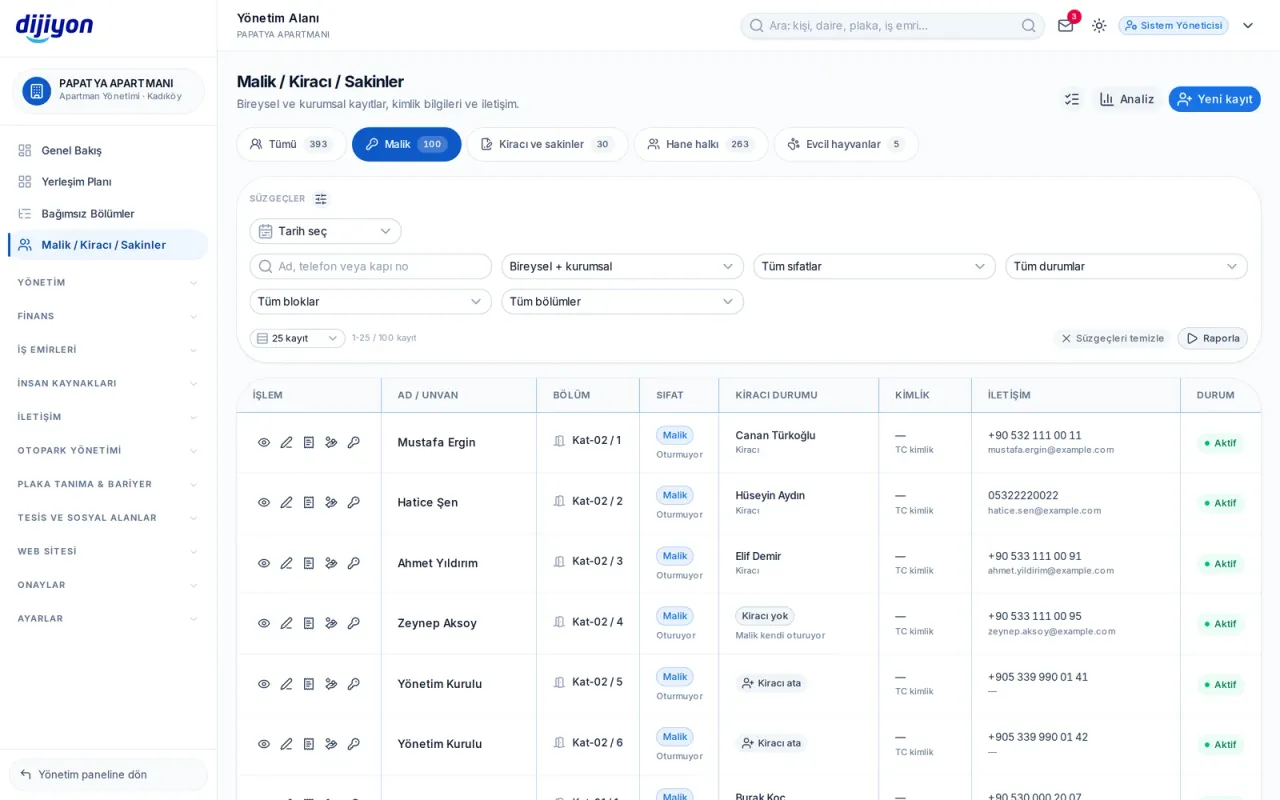
Property · Residents — from the owner to the household

Residents — from the owner to the household

Owner, tenant, household and pet records are split across five tabs, each with its counter above the list. Even in a complex of nine hundred people the list is paged on the server, so the browser doesn't slow down.

  • All · owner · tenants and residents · household · pets
  • Filters by block, unit, capacity, nationality and residence status
  • You choose which columns are shown
  • Assigning a tenant straight from the owner's row
  • Sending a resident an invitation link to the portal
  • Blood group is removed from columns, filters and reports for unauthorised users
Site layout plan and units

Site layout plan and units

Block, floor and door order is built on the plan; every unit is recorded with its land share, gross square metres, radiator count and dues. The same plan also opens in the add-a-block flow of the unit list — there are not two separate screens.

  • Unit label from block, floor and door number
  • Land share, gross m² and radiator count
  • Excel-like bulk unit definition
  • Columns with no data never appear in the table
  • A unit with linked records is not deleted but made inactive
  • Letterheaded Excel, PDF and CSV output
Managers — the board and its term

Managers — the board and its term

Roles such as manager, member, auditor and accountant are kept on a staffing card; you can also define your own title in free text. The decision book number and the dates of the management term also sit on this screen.

  • Role, title and start-end date of duty
  • ID verification and photo
  • Decision book number and management term
  • Login permissions are granted on a separate screen
Doors — the physical identity of the building

Doors — the physical identity of the building

Vehicle, pedestrian, service, car park and emergency doors are defined together with their recognition methods. Doors that appear in passage records but are not defined are gathered in a separate warning section; one click matches them and past records are corrected too.

  • Plate, card, remote, intercom, QR, fingerprint and face recognition
  • Barrier and camera details
  • Staff on duty and working hours
  • Undefined door warning and one-click matching
  • The passage count for the last 30 days appears in the report
General assembly — from the notice to the decision

General assembly — from the notice to the decision

A meeting record is opened; if the notice was given less than 15 days before the meeting, a warning appears (condominium law art. 29). At the first meeting the quorum is calculated on both the number of owners and the majority of land share; at the second meeting no quorum is required (art. 30). Agenda items are voted on; the result follows the chosen quorum automatically and cannot be changed by hand.

  • Ordinary and extraordinary meeting records
  • Attendance in person and by proxy, and the land share present
  • Moving to a second meeting if the quorum is not met
  • Presiding board, notice letter and uploading official documents
  • Attendance intentions declared in advance by residents are shown separately
Attendance roll — the evidence of the quorum

Attendance roll — the evidence of the quorum

Who attended in person and who by proxy is recorded unit by unit. How many units the same proxy represents is counted; if the proxy limit is exceeded, the row turns red.

  • Block, floor, door number and land share columns
  • Proxy name and proxy limit check
  • The signature column is marked separately
  • A blank roll can be printed even without a meeting record
Activities — decision, maintenance and meeting book

Activities — decision, maintenance and meeting book

Management activities of the decision, maintenance, meeting and announcement types are kept in one list. Each record takes an amount and up to 10 photographs; the total is calculated live above the list.

  • Planned · in progress · completed · cancelled
  • Up to 10 photographs as documentation per record
  • Date range, type and status filters
  • Letterheaded output with a total amount row

Start free

Open these screens on your own property

Open a free account; setup, data migration and training are on us.

Call us

Kapsam

The screens under Property

Every line is a real screen you can open and use in the panel.

Site layout plan

Floor layout and units

Units

Unit breakdown, roster and printing

Owner, tenant, resident

Owner, tenant and household

Gelen Bildirimler

Malik ve kiracıların arıza, istek ve şikayetleri

Managers

The board, its duties and units

Doors

Entry, exit and recognition methods

Activities

Decisions, maintenance, meetings

General assembly

The owners' assembly, agenda and decisions

Attendance list

Assembly attendance list

Start free

See the Property screens on your own property

Open a free account to see more; setup, data migration and training are on us.

Call us