İçeriğe atla
Dijiyon site yönetim yazılımı logosu

2 ekran

Overview

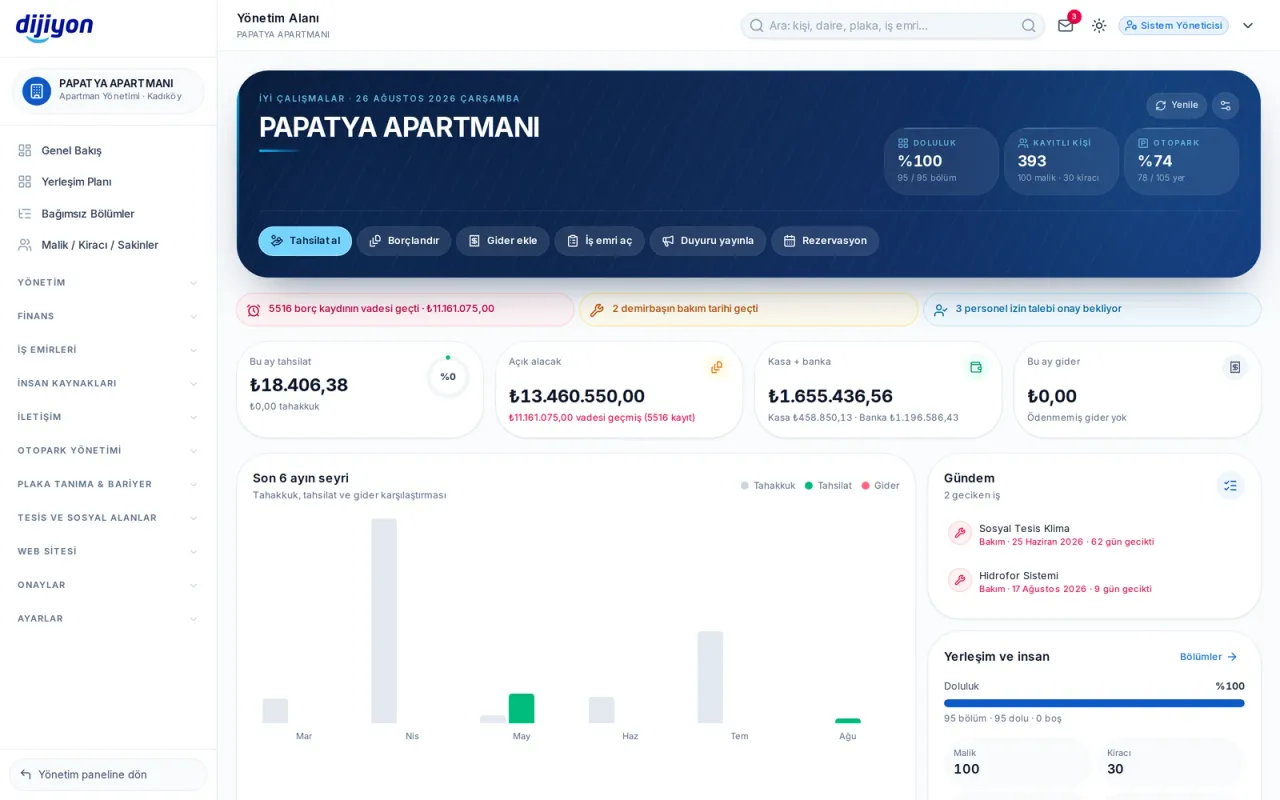
The manager's command centre: money, operations, people and the agenda on one screen. First you see the situation, then you act on it from the same screen with one click.

  • This month's collection, open receivables, till-bank and expenses in one strip
  • Shortcuts for collection, invoicing, expense and work order at the top
  • A partly authorised user's action waits in the approval queue before it is applied
Dijiyon Overview screen

Ekranlar

This is how Overview looks in the panel

Every image below is taken from Dijiyon's real interface; none of them is a mock-up.

Overview · Overview — run the day from here

Overview — run the day from here

Occupancy, registered people and the car park rate sit next to the identity card; this month's collection, open receivables, the till and bank total and the month's expenses are on separate cards. Overdue balances, assets past maintenance and pending leave requests land on the warning strip.

  • Shortcuts to take a payment, invoice, add an expense, open a work order and publish an announcement
  • The accrual, collection and expense trend of the last six months
  • Agenda: overdue maintenance and work orders with days remaining
  • Layout and people: occupancy, owners, tenants and staff numbers
  • Lists of the latest collections and the latest expenses
  • A management company login opens a combined command centre
Approvals — a partly authorised user's action waits here

Approvals — a partly authorised user's action waits here

An action by a partly authorised user is not applied straight away; a fully authorised manager reviews, approves or rejects it. What is approved is carried out, what is rejected is disregarded.

  • Pending, approved, rejected and all
  • Filtering by user
  • Income, expense, invoicing, resident, unit, till and bank actions
  • Announcement, survey, work order, asset and staff actions
  • Membership applications from the website also land in this queue

Start free

Open these screens on your own property

Open a free account; setup, data migration and training are on us.

Call us

Kapsam

The screens under Overview

Every line is a real screen you can open and use in the panel.

Overview

Analysis and summary

Approvals

Approval queue for partly authorised actions

Start free

See the Overview screens on your own property

Open a free account to see more; setup, data migration and training are on us.

Call us