İçeriğe atla
Dijiyon site yönetim yazılımı logosu

8 ekran

Communication

Announcements, e-mail, SMS and WhatsApp go out from one screen; you see who read and who acknowledged.

  • Announcement, e-mail, SMS and WhatsApp from one place
  • Who read it, who acknowledged it — person by person
  • Blocked list: someone who doesn't want messages is not targeted
Dijiyon Communication screen

Ekranlar

This is how Communication looks in the panel

Every image below is taken from Dijiyon's real interface; none of them is a mock-up.

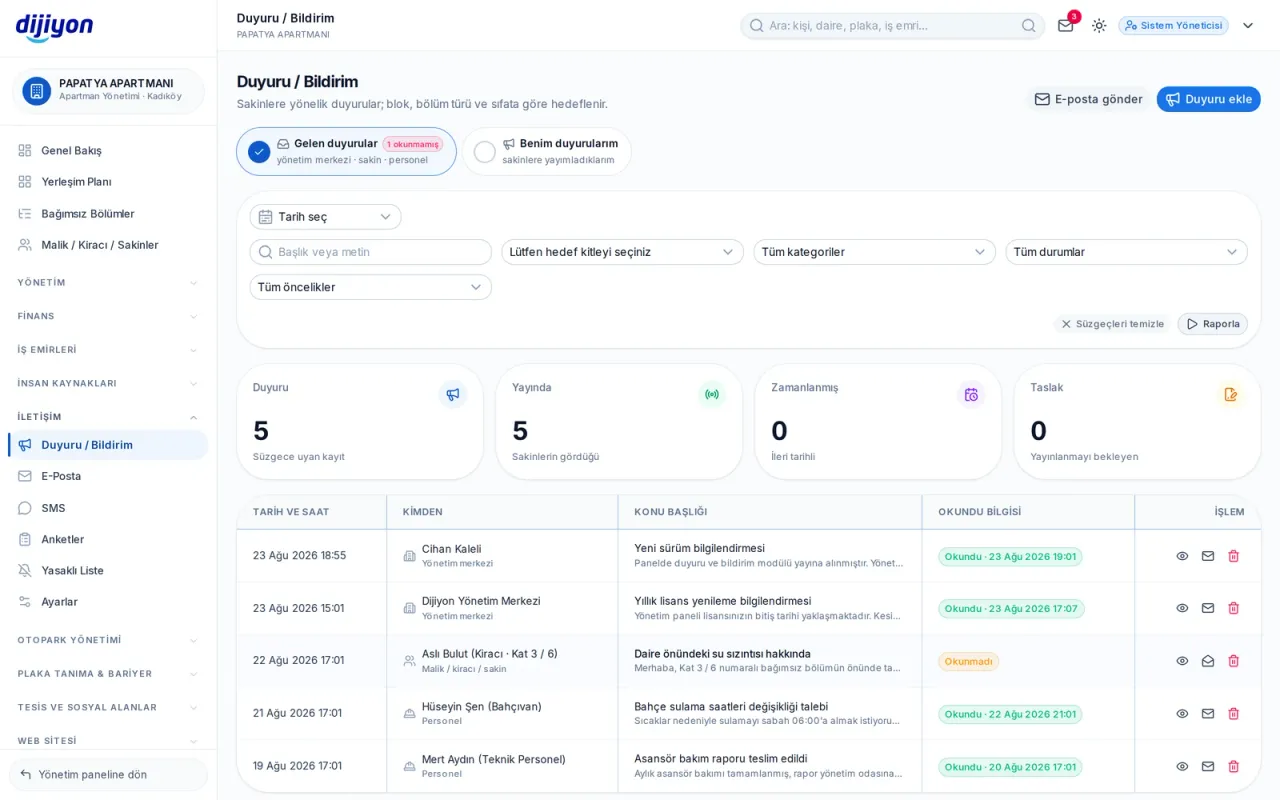
Communication · Announcements — outgoing and incoming on the same screen

Announcements — outgoing and incoming on the same screen

Announcements you publish to residents and announcements that come to you are split into two tabs. You choose the audience by block, unit type and capacity; how many people you will reach is counted live as the selection changes.

  • Read information and an "I have read and acknowledge" confirmation
  • A breakdown of who read and who acknowledged
  • Up to 5 images attached to an announcement
  • Draft, scheduled, published and archived statuses
  • Adding your own announcement categories permanently
E-mail, SMS and WhatsApp

E-mail, SMS and WhatsApp

All three channels are managed from the same screen. On the SMS side every 160 characters counts as 1 SMS (1 credit) — Turkish characters do not change that count; with the template variables filled in, the number of parts and the total credit use are calculated before sending.

  • Credit balance and consumption shown in advance
  • A switch to keep the message within a single SMS
  • Scheduled sending: date and time selection
  • Recipient preview; those missing an address or a phone are badged
  • Delivery and read status per recipient for each send
  • Adding the site's business card to the e-mail
Surveys — ask a question, see the result on a chart

Surveys — ask a question, see the result on a chart

A survey is built with single-choice, multiple-choice, five-point rating and free-text questions; it is announced through notification, e-mail and SMS together. The text of each channel is edited separately.

  • Four question types, with dynamic questions and options
  • Audience selection and live person count
  • Publish and close with one click
  • Results as a bar chart, question by question
Blocked list — someone who doesn't want messages receives none

Blocked list — someone who doesn't want messages receives none

People who don't want SMS, WhatsApp or e-mail are recorded; when a bulk send is prepared they are not included in the target list at all. The channel scope is chosen per person.

  • SMS and e-mail, e-mail only or SMS only scope
  • Live search across the whole person pool of the property
  • An unregistered person can be added by phone number alone
  • A reason field and removal from the block list

Start free

Open these screens on your own property

Open a free account; setup, data migration and training are on us.

Call us

Kapsam

The screens under Communication

Every line is a real screen you can open and use in the panel.

Overview

İletişim Yönetimi özeti ve bildirimler

SMS

SMS gönderimi, şablonlar ve kayıtlar

WhatsApp

WhatsApp gönderimi, konuşmalar ve şablonlar

E-mail

Toplu e-posta gönderimi ve raporlar

Announcements

Publish an announcement to residents

Surveys

Resident surveys and results

Directory

İletişim Yönetimi kullanım kılavuzu

Kara Liste

SMS ve e-posta almak istemeyen kişiler

Start free

See the Communication screens on your own property

Open a free account to see more; setup, data migration and training are on us.

Call us