
İçeriğe atla
Dijiyon site yönetim yazılımı logosu

9 ekran

Staff

The whole staff process, from joining to payroll, in one place; expenses and leave link themselves to the financial statements.
  • Personnel files, timesheets, leave, advances and payroll in one section
  • An approved staff expense becomes an expense entry
  • Finding candidates easily through the regional pool
Dijiyon Staff screen

Ekranlar

This is how Staff looks in the panel

Every image below is taken from Dijiyon's real interface; none of them is a mock-up.

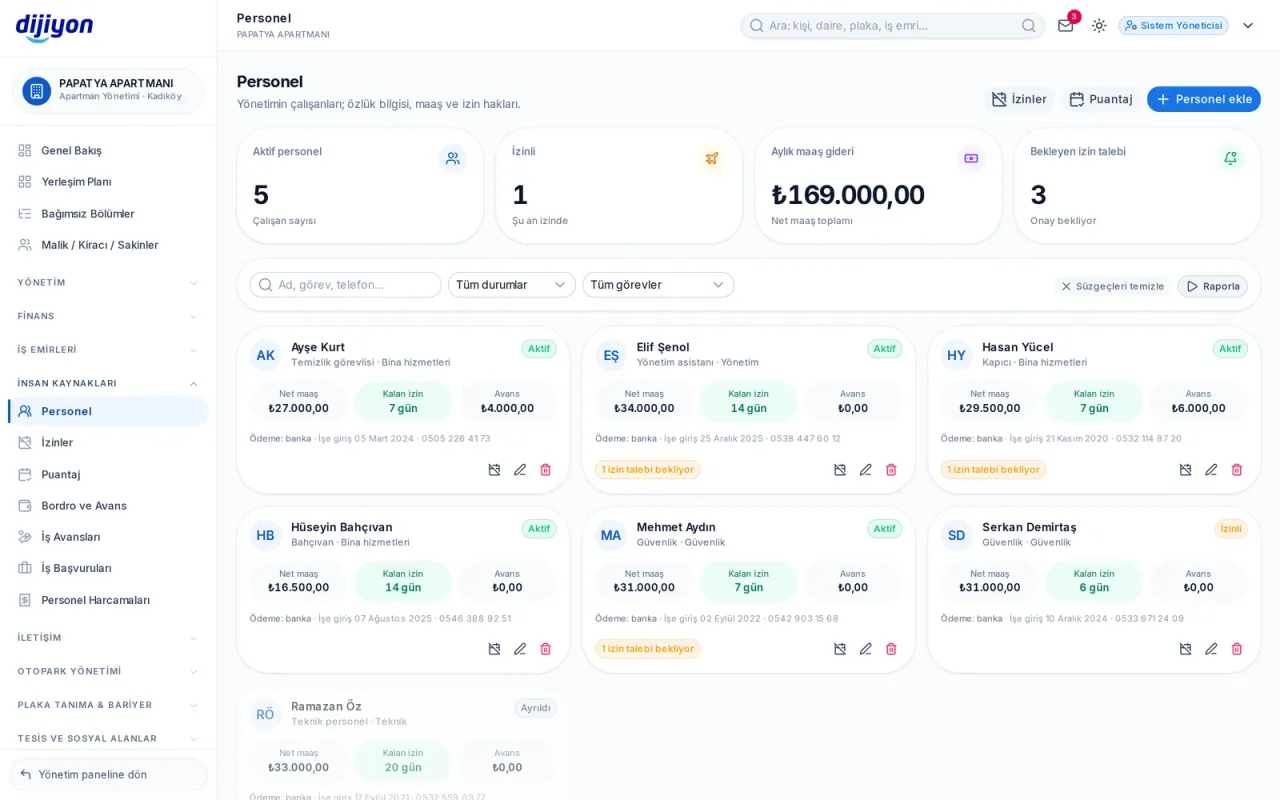
Staff · Staff — personnel card and headcount

Staff — personnel card and headcount

Caretakers, security, cleaning and technical staff are all in one list. Each card shows net salary, remaining leave and total advances side by side; ID, start date, role and contact details are inside the card.
  • Filtering by role, department and status
  • ID verification, social security number, start and leave dates
  • Uploading a CV file
  • A single-use invitation link for the employee; no password is generated
  • Scores and comments residents give staff are on a separate panel
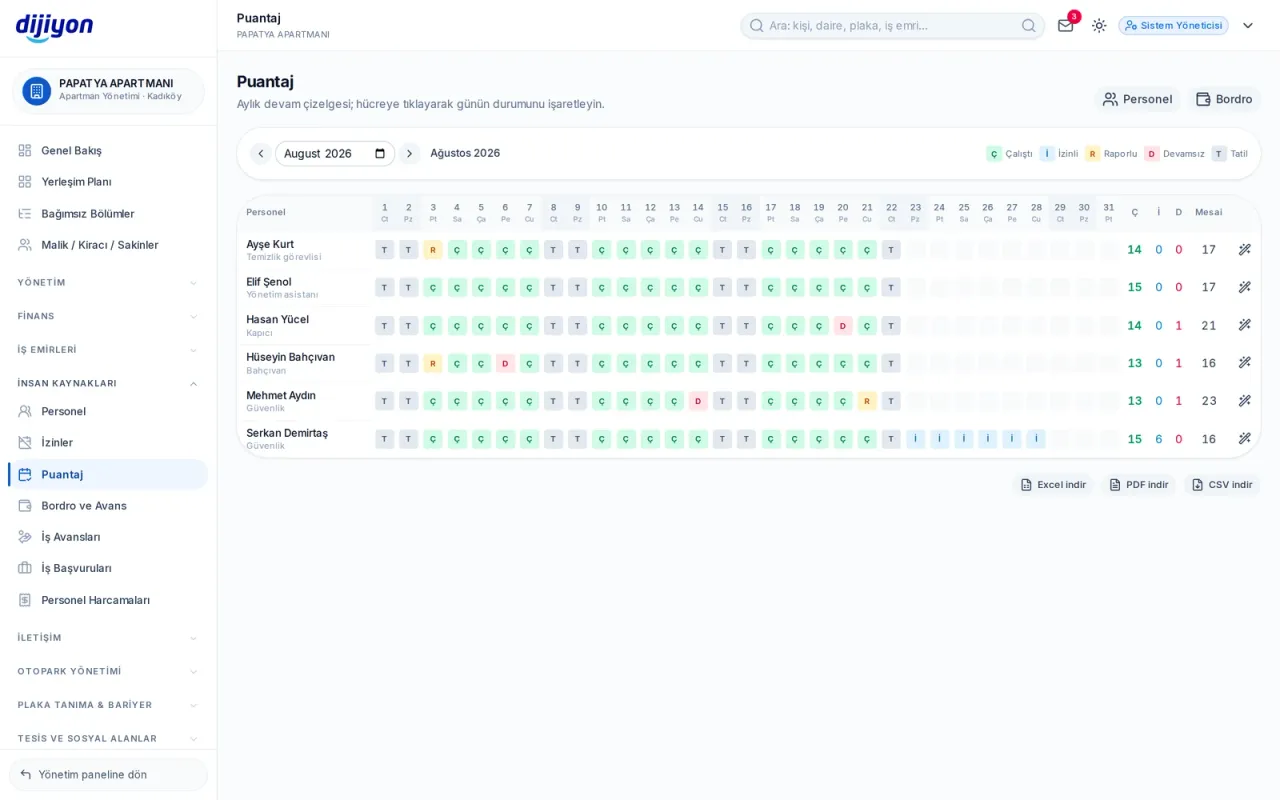
Staff · Timesheets — attendance and overtime

Timesheets — attendance and overtime

Who worked how many days during the month and how many hours of overtime; clicking a cell cycles through the statuses. Weekend days appear in a different colour, and the timesheet feeds the payroll directly.
  • Worked, on leave, on sick leave, absent and holiday statuses
  • A "fill the month" shortcut to mark empty days in bulk
  • Worked, on-leave and absent counters per row
  • A total overtime hours column
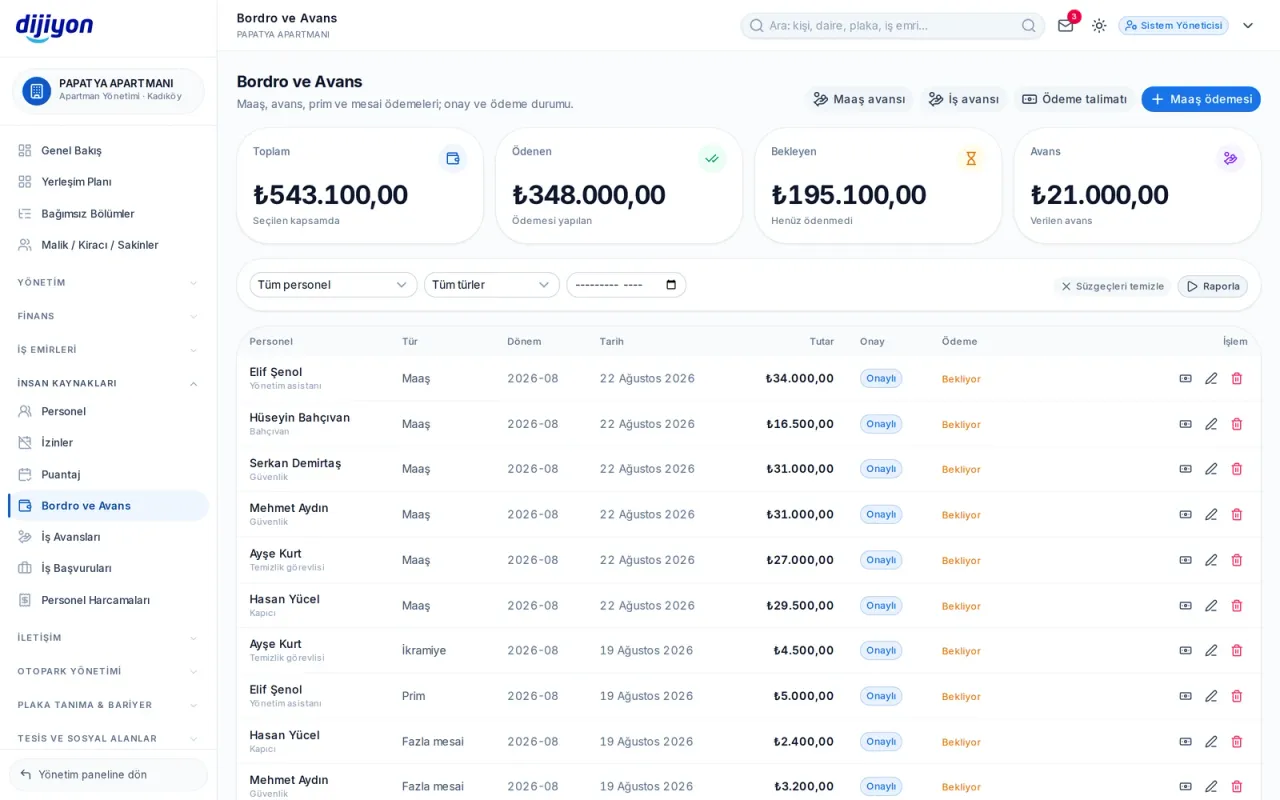
Staff · Payroll and advances — ready on pay day

Payroll and advances — ready on pay day

Salary, advance, bonus, overtime, gratuity and severance are recorded on the same screen. When salary is selected, the employee's net salary is suggested in the amount field; approval and the paid mark are kept separately.
  • Request, approved and rejected approval flow
  • Payment date and method with the paid mark
  • Payment instruction: to whom, how much, which IBAN
  • Total, paid, pending and advance summary
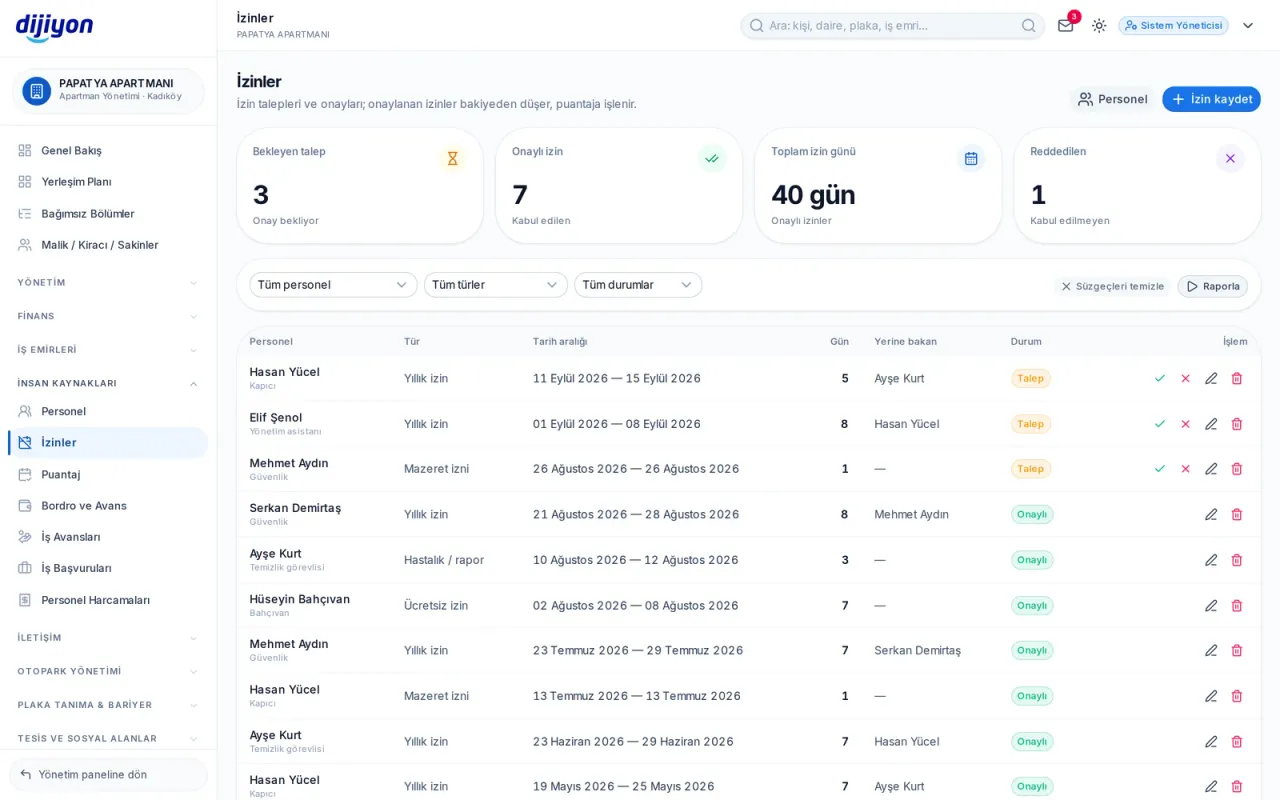
Staff · Leave — entitlement and use

Leave — entitlement and use

When annual leave is selected, the employee's entitlement, days used and days remaining are shown live; if the balance is exceeded a warning appears. The number of days is calculated from the dates and can be changed by hand if needed.
  • Annual, compassionate, sick, unpaid, maternity and public holiday leave
  • Request, approved, rejected and cancelled flow
  • A field for who will cover
  • The number of pending requests on the summary strip
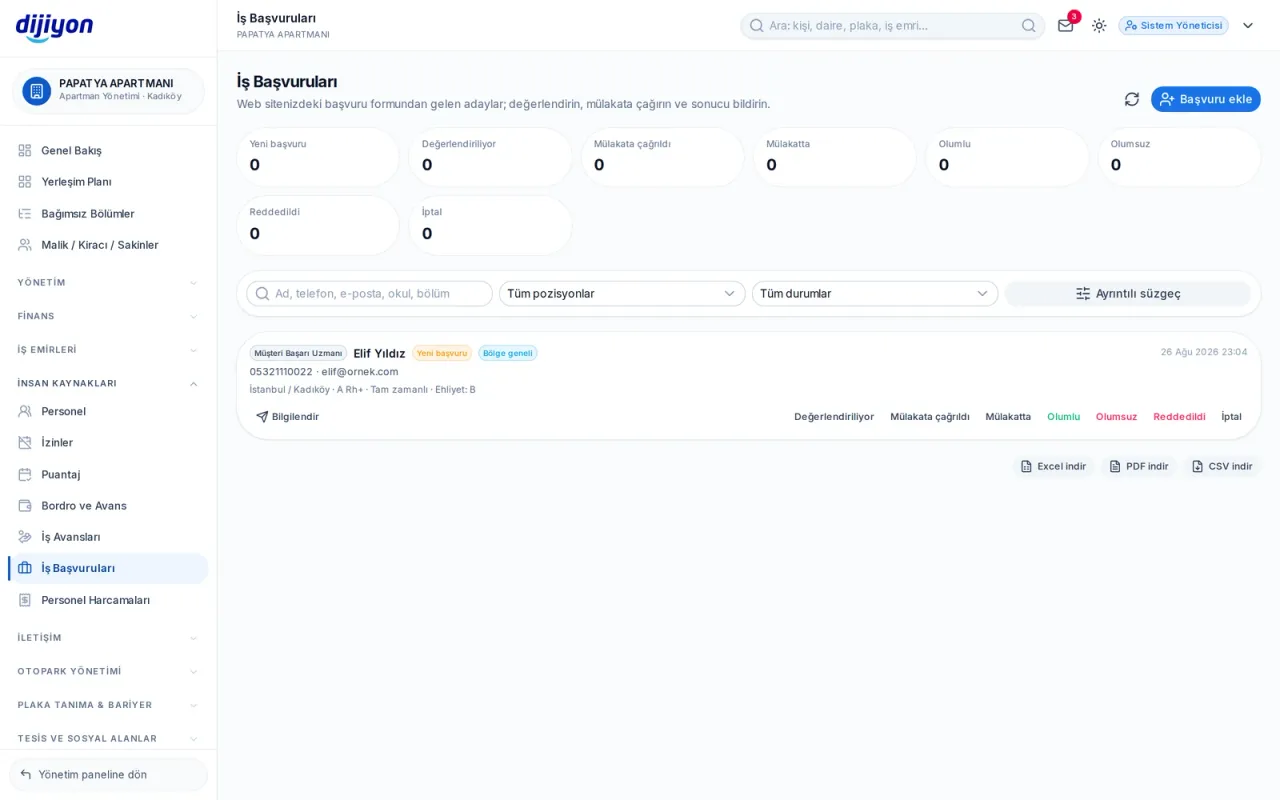
Staff · Job applications and candidate pool

Job applications and candidate pool

Applications arriving at your management's website land here. You also see candidates opened to your province's pool by head office; blood group and disability information is never shown to unauthorised users.
  • All, our own site and candidate pool tabs
  • New, under review, interview, positive and negative stages
  • Once a decision is made, an SMS or e-mail notice to the candidate, with a ready template
  • Recording a walk-in candidate within the same form
  • CV preview window
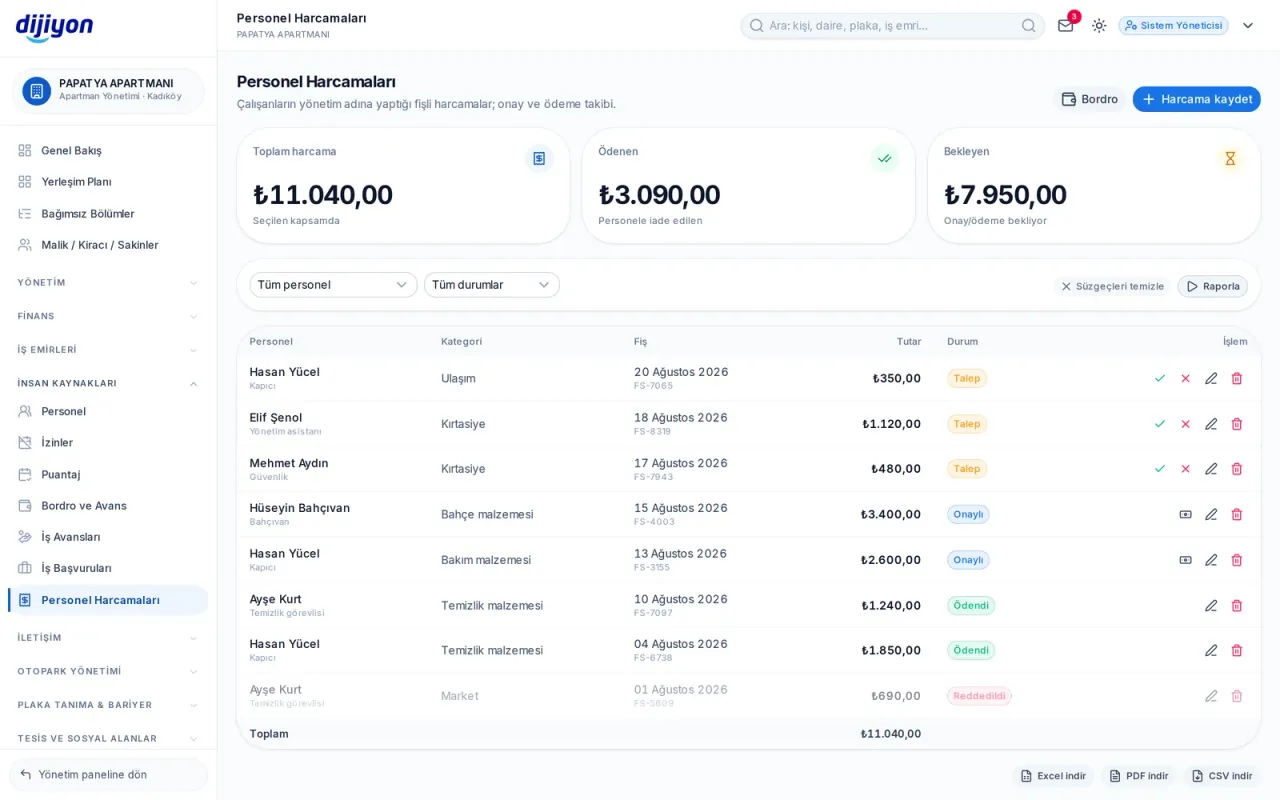
Staff · Staff expenses

Staff expenses

Expenses made by staff on behalf of the management are recorded with their receipt. The document can be uploaded even before the record; once the expense is approved it turns into a payment.

  • Uploading receipts, invoices and vouchers; multiple files
  • Request, approved and paid flow
  • Adding your own expense category permanently
  • Total, paid and pending summary
Work advances — given, spent, remaining

Work advances — given, spent, remaining

An advance given to an employee is recorded; their spending is listed beneath it. An approved expense is deducted from the advance, and the remainder is treated as returned, closing the advance.

  • Cash, bank and other payment methods
  • A document and expense type per expense
  • Approving or rejecting a pending expense
  • Summary of advance given, expenses approved, pending and remaining

Start free

Open these screens on your own property

Open a free account; setup, data migration and training are on us.

Call us

Kapsam

The screens under Staff

Every line is a real screen you can open and use in the panel.

Staff

Staff records

Leave

Leave requests and entitlements

Timesheets

Attendance and overtime tracking

Payroll

Salary, advances and payments

Work advances

Advances given and offsets

Expenses

Staff expense receipts

Post a job advert

Publish a vacancy advert

Job applications

Candidate applications from the site

Candidate pool

Candidates applying to managements in your area

Start free

See the Staff screens on your own property

Open a free account to see more; setup, data migration and training are on us.

Call us