İçeriğe atla
Dijiyon site yönetim yazılımı logosu

6 ekran

Car park

Parking spaces, allocations and charging stations on the plan; the passage records that come from the barrier are linked to the vehicle and the unit.

  • Spaces on the plan: allocated, visitor, free
  • The plate isn't typed in — it's chosen from the unit's registered vehicles
  • Barrier passages are matched to a person and a unit
Dijiyon Car park screen

Ekranlar

This is how Car park looks in the panel

Every image below is taken from Dijiyon's real interface; none of them is a mock-up.

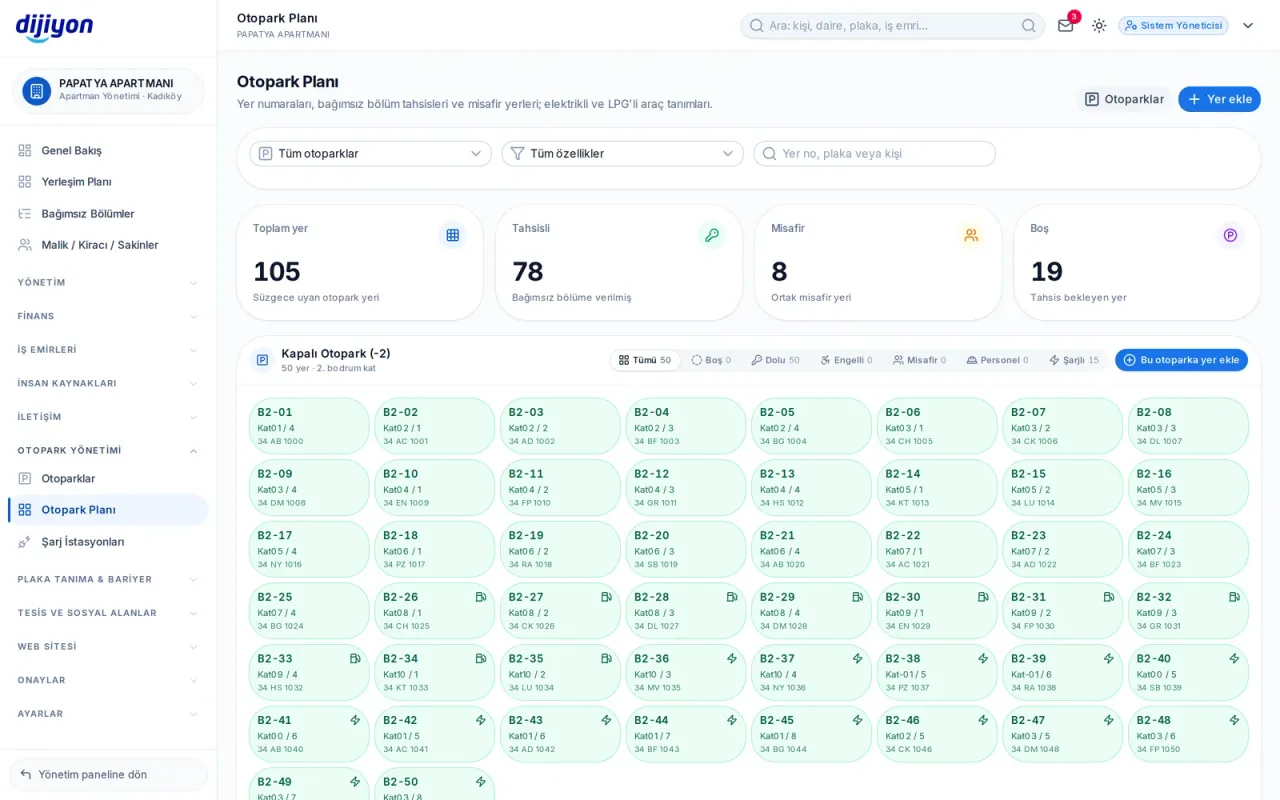
Car park · Car park plan — every space a tile

Car park plan — every space a tile

Spaces are laid out on the plan: allocated to a unit, visitor, shared, staff or free. When a filter is chosen the list updates instantly; there is no separate reporting step.

  • Counters for total, allocated, visitor and free spaces
  • Quick filters for free, occupied, accessible, visitor and charging spaces
  • On allocation the plate is chosen from the unit's registered vehicles
  • If an accessible space has no accessible vehicle, the system warns
  • The system suggests the space number by looking at the previous one
  • Search by space number, plate and person
Car parks — definition and price tariff

Car parks — definition and price tariff

Open, covered, multi-storey and visitor car parks are defined separately. When a new car park is opened, the total number of spaces and the split between accessible, electric, LPG, visitor and staff is entered; the spaces are created automatically.

  • Space number prefix, starting number and digit count
  • Paid or free, with a free-minutes setting
  • Irregular layout: a car park with no space allocation
  • Bulk car park upload from Excel
  • Approval of space change requests from residents
Charging stations — points for electric vehicles

Charging stations — points for electric vehicles

Charging points are recorded with brand, model, power, current type and socket type. When a station is linked to a parking space, that space is marked as electric on the plan automatically; if the station is removed, the mark goes with it.

  • AC and DC; Type2, CCS, CHAdeMO and Schuko sockets
  • Socket count and price per kilowatt-hour
  • Installation date, warranty end and service company
  • Active, faulty, under maintenance and inactive statuses
  • Summary of total sockets and installed power
Vehicle list — who, which vehicle, which space

Vehicle list — who, which vehicle, which space

Every vehicle in the property in one list: which unit it belongs to, who uses it, whether it has a parking right and whether its space is allocated. The list updates the moment a filter is chosen.

  • The vehicle limit per unit is checked both on screen and on the server
  • Turning the parking right on and off with one click
  • Filters by fuel type, category and parking status
  • Moving straight from the vehicle to space allocation
  • Entry-exit history per vehicle
Vehicle passages — the record from the barrier

Vehicle passages — the record from the barrier

Entry and exit movements coming from plate recognition and the barrier system are linked to the unit and the person. The confidence percentage of the reading appears on the row; unregistered vehicles are counted separately.

  • Entry and exit direction with a result badge
  • Registered, unregistered and refused passages kept apart
  • Search by plate, person and door
  • The last 15 days by default, with a selectable date range
Partner companies — request a quote

Partner companies — request a quote

Partner companies in plate recognition and barriers, together with their campaigns, appear on this screen. You can request a general or a campaign-specific quote; the status of the requests you send stays on the same page.

  • Company profile, services, regions and contact person
  • Campaign terms and validity date
  • Requesting a quote with name, phone, e-mail and a note
  • Your request has been sent, is being reviewed, was approved or was not accepted

Start free

Open these screens on your own property

Open a free account; setup, data migration and training are on us.

Call us

Kapsam

The screens under Car park

Every line is a real screen you can open and use in the panel.

Car parks

Car parks, spaces and allocations

Car park plan

Layout and occupancy

Charging stations

Electric vehicle charging points

Vehicle list

All vehicles, their owners and parking status

Vehicle passages

Barrier passage records

Partner companies

Partner companies and campaigns

Start free

See the Car park screens on your own property

Open a free account to see more; setup, data migration and training are on us.

Call us