İçeriğe atla
Dijiyon site yönetim yazılımı logosu

User type

Other managers

For managers who run their own complex or building and want the books closed on time and to be accountable to residents.

  • Manage invoicing, collection and accounting from one screen
  • Who owes what and for how long — all balances in a single list
  • Everything from enforcement proceedings to the decision book is digital
  • Raise a work order, find a supplier, request quotes
  • Run the property transparently with visual reports
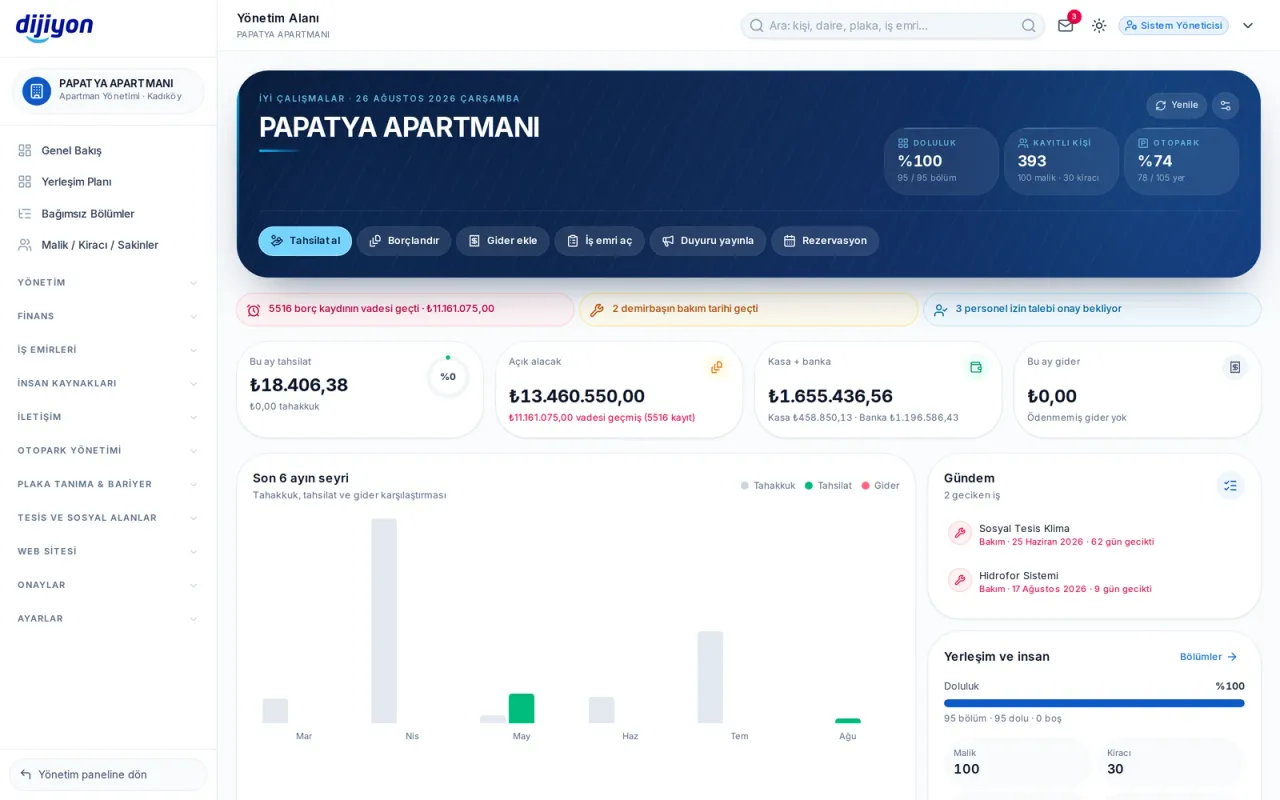
Other managers · The first screen you open in the morning

The first screen you open in the morning — Collection rate, open receivables, till and bank position and overdue jobs at a glance.

Sound familiar?

Other managers: what you deal with most

“Collecting dues takes up most of my time.”

Invoicing is done from one screen; collections match automatically from cards, bank statements and the till.

“I lose track of who has paid and who hasn't.”

Overdue balances, units in debt and the collection rate sit live on the overview.

“Preparing the books for an audit is a struggle.”

The trial balance, balance sheet and general ledger build themselves in the background and download as letterheaded Excel and PDF.

“Reaching residents is hard; everyone writes on a different channel.”

Announcement, SMS, WhatsApp and e-mail go out together from one screen, and who read them is reported.

“Fault tracking stays in my notebook.”

A work order is opened, assigned to staff and closed with a photo; overdue jobs raise a flag on the agenda.

“Finding a tradesman who knows the job and gathering quotes takes days.”

You filter the supplier pool by trade and location and request quotes; you can also add your own supplier to your list. Through the wholesale market you buy the property's materials at wholesale prices.

“When the management changes, everything starts from zero.”

Every record, decision and document stays in the system; the handover happens in a single sitting.

Highlights

Other managers: what you can do with Dijiyon

One panel

All management tasks in one place.

Automatic accounting

Income, expenses and reconciliation are posted automatically.

Enforcement

Legal process management for overdue receivables.

Reporting

Full control with live visual reports.

Views from the panel

Key screens of the property management software

All images below are taken from the current interface of the Dijiyon property management software.
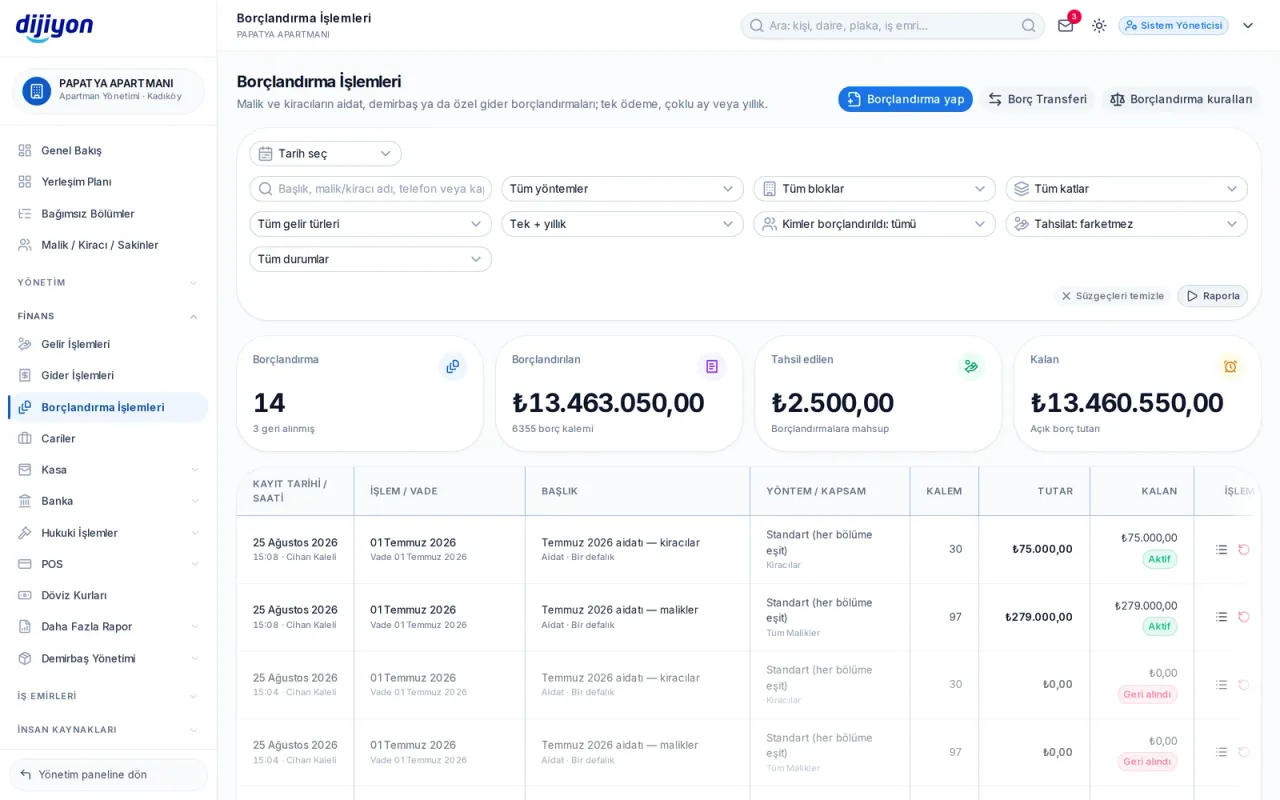
Other managers · Invoicing on one screen

Invoicing on one screen

Land share, equal split or per person; the late charge is applied automatically.

Features

Other managers: all 106 screens included

The list comes from the panel's real menu; when a new screen is added to the panel it appears here by itself. There are no extra modules, licences or invoices.

16

sections

106

screens

One

price — no extra modules

Membership

Members, bodies, dues

9 ekran
  • Member dashboardMembership, dues and compliance record
  • MembersIndividual and corporate member records
  • Bodies and groupsBoards, committees and member groups
  • Membership duesDues accrual and debt tracking
  • Dues invoicingDues accrual and special invoicing
  • Events and trainingCongress, seminar, training and attendees
  • Member movementsJoining, leaving and 45-day notifications
  • Regulatory complianceDeclarations, notifications, books
  • Association detailsRegister number, public benefit, bookkeeping basis

Donations and scholarships

Donors, sponsors and scholarship holders

6 ekran
  • Donors and sponsorsIndividual and corporate supporters
  • DonationsCash, in-kind, conditional and foreign donations
  • Donation campaignsDonation appeals published on the website
  • Scholarship applicationsApplication, assessment and decision
  • Scholarship holdersScholarship holders, amount and sponsor
  • Scholarship paymentsPeriodic payments and their breakdown

Property

Units, residents, board

9 ekran
  • Site layout planFloor layout and units
  • UnitsUnit breakdown, roster and printing
  • Owner, tenant, residentOwner, tenant and household
  • Gelen BildirimlerMalik ve kiracıların arıza, istek ve şikayetleri
  • ManagersThe board, its duties and units
  • DoorsEntry, exit and recognition methods
  • ActivitiesDecisions, maintenance, meetings
  • General assemblyThe owners' assembly, agenda and decisions
  • Attendance listAssembly attendance list

Portfolio

Rent, occupancy and owner

8 ekran
  • Portfolio dashboardOccupancy, monthly rent and collection
  • PropertiesProperties, their locations and status
  • EstatesComplex, residence, mall, business centre, industrial zone
  • Lease agreementsContract, term, increase and deposit
  • Dues invoicingRent accrual and cost recharging
  • Rent trackingPaid, overdue and ageing
  • Eviction and enforcementNotice, litigation, enforcement and eviction flow
  • Owner statementRental income, expenses and net entitlement

Shopping mall

Store, rent and common expenses

5 ekran
  • Mall dashboardOccupancy, rent, turnover and common expenses
  • StoresSales area, category, brand and tenant
  • Turnover declarationsMonthly turnover, turnover rent and minimum rent
  • Common expense sharePeriod budget and allocation by sales area
  • EventsEvent calendar, capacity and attendance

Finance

Daily cash flow

11 ekran
  • Income entriesCollection and income types
  • Expense entriesPayments and expense types
  • Dues invoicingDues and expense invoicing
  • Current accountsAccount cards, paid and open balances
  • TillsCash till definitions
  • Till movementsTill receipts and payments
  • Bank / institutionBank and financial institution account definitions
  • Bank movementsAccount statement and matching
  • Card terminal movementsCollections made by card
  • Exchange ratesCentral bank + panel rate
  • Commission ratesCard commission and instalment rates

Accounting

Books, reports, enforcement

9 ekran
  • Financial reportsAccounting and finance reports
  • Outstanding balancesUnits in debt and overdue ageing
  • Trial balanceDebit-credit balance table
  • Balance sheetAssets and liabilities: till, bank, accounts
  • General ledgerLedger by account
  • BudgetBudget plan and realisation
  • Enforcement filesEnforcement follow-up and files
  • Enforcement collectionsCollections received through enforcement
  • LawyersRecords of partner lawyers

Facilities

Social areas and fixed assets

8 ekran
  • Social areasShared areas
  • BookingsArea bookings
  • Booking calendarCalendar view
  • Facility salesFacility sales and collection
  • Sales receiptsReceipts issued
  • ProductsProducts and services sold
  • Fixed assetsInventory and condition
  • Maintenance trackingPeriodic maintenance plan

Car park

Car park, vehicles, barrier

6 ekran
  • Car parksCar parks, spaces and allocations
  • Car park planLayout and occupancy
  • Charging stationsElectric vehicle charging points
  • Vehicle listAll vehicles, their owners and parking status
  • Vehicle passagesBarrier passage records
  • Partner companiesPartner companies and campaigns

Procurement

Work orders and suppliers

4 ekran
  • Work ordersFault and maintenance work orders
  • Find a supplierSearch for suppliers by service type and request quotes
  • New supplierAdd your own supplier to your list
  • Wholesale marketA wholesale marketplace for your management

Staff

Headcount, payroll, leave

9 ekran
  • StaffStaff records
  • LeaveLeave requests and entitlements
  • TimesheetsAttendance and overtime tracking
  • PayrollSalary, advances and payments
  • Work advancesAdvances given and offsets
  • ExpensesStaff expense receipts
  • Post a job advertPublish a vacancy advert
  • Job applicationsCandidate applications from the site
  • Candidate poolCandidates applying to managements in your area

Communication

Announcements, messages and surveys

8 ekran
  • Overviewİletişim Yönetimi özeti ve bildirimler
  • SMSSMS gönderimi, şablonlar ve kayıtlar
  • WhatsAppWhatsApp gönderimi, konuşmalar ve şablonlar
  • E-mailToplu e-posta gönderimi ve raporlar
  • AnnouncementsPublish an announcement to residents
  • SurveysResident surveys and results
  • Directoryİletişim Yönetimi kullanım kılavuzu
  • Kara ListeSMS ve e-posta almak istemeyen kişiler

Settings

Setup and definitions

9 ekran
  • GeneralCurrency and accrual arrangement
  • Interest settingsLate-charge rate, method and interest waiver approval
  • Communication settingsE-mail, SMS and WhatsApp provider settings
  • Bank settingsAccount matching and import
  • Card terminal definitionsCard terminal setup and editing
  • Connection keyPlate recognition system integration
  • Printer settingsReceipt and printer format
  • LicenceSubscription terms, remaining period and payments
  • KVKK TalepleriKişisel veri bilgi ve silme taleplerini karşılayın

This list is the same for every management type: apartment buildings, complexes, residences, shopping malls, business centres, industrial estates, associations, foundations and professional chambers all get the same package.

How it starts

The move is done in 4 steps

Setup, data migration and training are on us; you carry on where you left off.

  1. 1

    Data is migrated

    Units, residents and balances are transferred from your old programme free of charge.

  2. 2

    The setup is done

    Income types, the invoicing method and the late-charge rate are defined once.

  3. 3

    The monthly cycle runs

    Invoicing is started, collections post themselves and the reports come ready.

  4. 4

    You account for it

    At the general assembly you open the screen and go through the trial balance and the income-expense table together.

What people ask most
Other managers: frequently asked questions

Start free

Try Dijiyon free — Other managers

Open your account; setup, data migration and training are on us.

Call us